On Zoom
The class comes to you
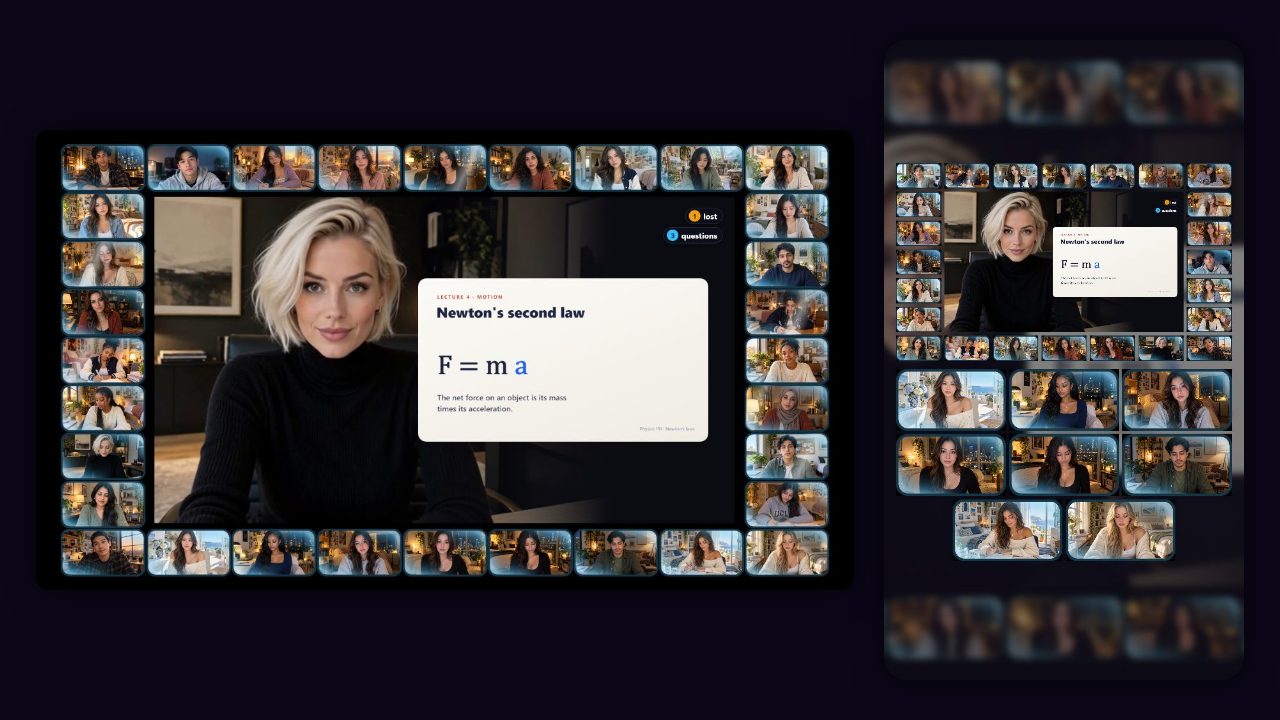
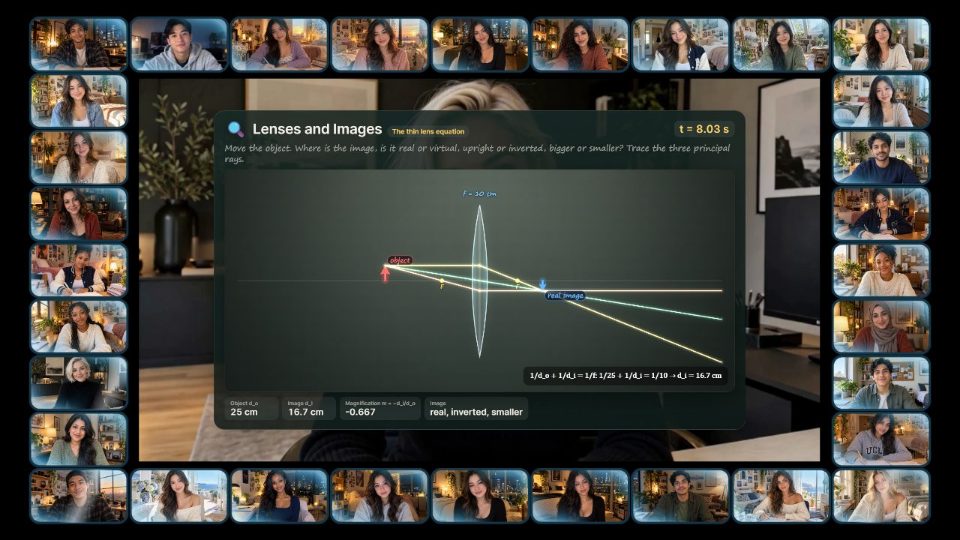
Every student's live tile seated around you, gliding from room to room. Proscena goes back into Zoom as your camera, so they see the classroom you've built, not a wall of boxes.
 Proscena
Get early access
✦ Made by a teacher, for teachers ✦
Proscena turns your online class into a room again. Your students seated around you, their work live in your picture, and a class that answers back. Teaching online, finally built for teaching.
See it run
Your lesson plan, your class, the chat and every activity, a click away while you teach.
Before & after
Drag across. On the left, your class in Zoom's gallery: a wall of boxes. On the right, the same students seated all around you, with you at the front of the room.
Only in Proscena
The student who got lost three slides ago. The answer you can't see. The quiet ones who never unmute. We looked for any tool that brings these back into your live picture. We didn't find one, so we built it.
The slide that lost them is still there. Students can go back to the exact moment, point to the spot and ask, without raising a hand in front of everyone. You bring it back on screen.
Meet Show RewindSend a problem and watch the whole class think. Every student works it out on their own phone, and the best thinking goes up on screen beside you.
See the whiteboardsNo app, no accounts: a code and they're in. Votes, questions and a quiet “I'm lost” that only you see, before anyone checks out.
See the phonesHow does that compare with Zoom, OBS, polling apps, whiteboard sites and lecture capture? We put it side by side, as fairly as we can.
How Proscena compares →Online, in the room, or both
The phone in every student's pocket is the secret. It works the same whether they're on Zoom at home or sitting right in front of you, so the most engaging class you've ever taught can happen anywhere.
On Zoom
Every student's live tile seated around you, gliding from room to room. Proscena goes back into Zoom as your camera, so they see the classroom you've built, not a wall of boxes.
In the classroom
Put Proscena on the big screen. Students scan a code and each phone takes a seat in your layouts, so the prize wheel spins with the faces in front of you and every vote lands on the wall as they tap.
Both at once
Students at home and students in the room answer on the same page: one poll, one whiteboard round, one Rewind. Nobody is the second-class audience.
Members only
We could show you everything here. We'd rather you see it with your own class. Here's a glimpse of what opens up when you're in.
Seat your class around you like a real classroom. Then change the room in a click and watch every student glide to a new seat. They notice. Then they lean in.
Warm-ups, quick checks, games and big reveals, ready the second you are. A prize wheel made of your students' own faces is just the start.
Every vote, answer and phone activity counted for each student, class after class, and ready for your Canvas gradebook. No more spreadsheets after the bell.
A single key on a Stream Deck takes an activity from start to finish, one press at a time. Your eyes stay on your students, not on your settings.
A vertical version of your class, made live beside the wide one, laid out for a phone screen. Record both for students who missed it.
With Proscena Plus, an assistant that follows your lesson and suggests what to put on screen next, helps you plan the next class, and tells you what landed.
How it works
Your camera, your slides and the activities you want. Proscena sets up the rest for you.
Start your Zoom class. Your students arrive as live tiles, seated around you.
Proscena goes into Zoom as your camera. Record the lesson as you go, in wide and vertical at once.
System requirements
Proscena is a live video studio: it draws every tile, effect and picture sixty times a second. Give it room, and the show stays smooth.
Minimum
A small class, one picture at a time
Recommended
A full class, the vertical picture and recording at once
On a laptop: plugged in, with a graphics card of its own. Built-in graphics share the computer's memory, so a 16 GB laptop with them alone runs short with a full audience on screen.
Made for everyone who teaches
classrooms✦lecture halls✦tutoring✦training✦workshops
online, and wants class to feel like class again.
Pricing
Buy Proscena once and it's yours to keep. Add Proscena Plus by the month when you want AI planning and teaching beside you.
Proscena
$149one time
Yours to keep · a year of updates included
Proscena Plus
$19/ month
Adds to Proscena · cancel any time
Questions
Zoom shows your class as a wall of boxes, and every activity happens in another tab. OBS is a powerful general tool, but you build every scene yourself. Proscena is made for one thing: teaching a live class online. Your students seated around you, their work and answers in your live picture, and activities ready to go, all run while you teach, from a click or a Stream Deck.
Yes. Your students come into Proscena as live tiles, and Proscena goes back into the class as your camera, so everyone sees the room you've made.
No. Students join activities from their phone's browser with a class code. Nothing to install, nothing to sign up for.
Yes. Link a class list to your Canvas course, and a class day's participation goes into the gradebook as grades.
No. Proscena has its own video engine and runs at 60 frames a second by itself. If you already use OBS, Proscena can import your scenes.
No. Proscena does everything a class needs on its own. Plus adds AI: smarter suggestions while you teach, lessons and overlays planned with you, and a debrief that tells you what to try next.
Proscena is for Windows 10 and 11 for now.
On your computer. Your scenes, recordings, class lists and settings are saved locally. You sign in once to activate Proscena; after that it works offline, and nothing about your class leaves your computer.
Yes. It records to a file of its own beside the program's recording, and can go live to a different server at the same time.
At least a 64-bit Windows 10 or 11 PC with a 6-core processor from 2021 or newer, 16 GB of memory and a graphics card with 4 GB of its own memory; for a big audience, the vertical picture and recording at once, 8 cores, 32 GB and a graphics card with 8 GB. The full requirements. Proscena shows how hard your computer is working, and its lighter settings help an older one along.
Your class lists, chat, participation and recordings stay on your computer, and Proscena doesn't upload your lessons anywhere. Students' phones reach your computer through a private link for the activities you run. The AI features, when you use them, send what you ask to the AI service you chose.
Yes, and it shines there. Put Proscena on the projector, and students join on their phones with a code: each phone takes a seat in your layouts, the games pick from the students in the room, and votes, whiteboards, questions and Show Rewind all come from the phones. With students at home on Zoom at the same time, everyone answers on the same page.
Yes. Keep a brand kit for each school, course or class, with its logo and colors, and switch between them in a click. Your logo goes on your title cards, fills the spare seats in the layouts, and animates in its own scene.
Yes. Effect packs are folders: add one from Proscena, see it in your effects, and remove it with one click when you're done.
✦ Early access ✦
Proscena is opening to its first teachers. Leave your email and you'll hear the moment your seat is ready.